Write a single promise the assistant can keep today, such as preparing release notes from selected project material.
Assistant launch canvas
Creating AI assistant products begins with one useful promise.
Use this guide when you want to move from a blank chat box to a private assistant that has a role, trusted material, clear permissions, test examples, and a first launch review.
Guide / launch canvas
creating ai assistant
01Promise02Material03Tools04Examples05Launch
RoleKnowledgeConsentReviewIteration
Creation is a sequence of product decisions.
Creating AI assistant experiences should begin with a narrow promise: who the assistant helps, what job it improves, what material it can use, what actions need approval, and how the first five examples will be judged. The assistant does not need every channel or tool on day one. It needs a promise that a real user can test, reject, and improve.
Choose the files, notes, examples, or records the assistant may rely on, and keep everything else outside the first version.
Prepare normal, messy, missing-input, sensitive, and out-of-scope examples before launch.
After the first review, change the profile, knowledge, tool boundary, or memory rule before adding extra channels.
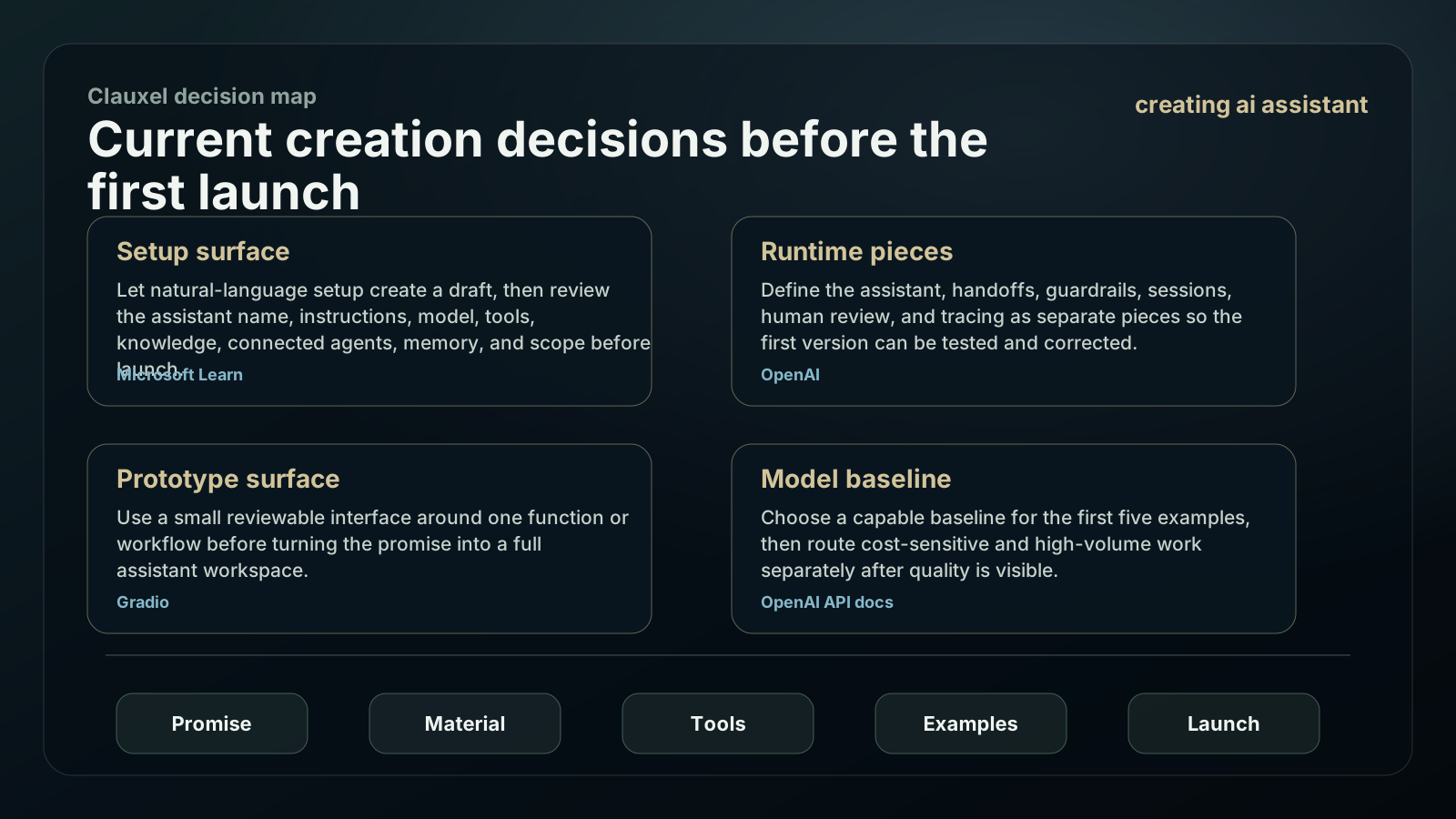
Current creation decisions before the first launch
Start with a small assistant card and a visible review loop. Platform automation can speed setup, but the product still needs a promise, knowledge boundary, tool policy, and launch examples.
Let natural-language setup create a draft, then review the assistant name, instructions, model, tools, knowledge, connected agents, memory, and scope before launch.
Define the assistant, handoffs, guardrails, sessions, human review, and tracing as separate pieces so the first version can be tested and corrected.
Use a small reviewable interface around one function or workflow before turning the promise into a full assistant workspace.
Choose a capable baseline for the first five examples, then route cost-sensitive and high-volume work separately after quality is visible.
Create the first assistant in six decisions.
Each decision should be visible in the product and testable by a reviewer who did not write the prompt.
Name the user moment
Pick a repeated moment where help changes the outcome: triage, drafting, comparison, research, planning, or review.
Write the role card
State the assistant role, tone, topic boundary, escalation habit, and examples of useful answers.
Load only trusted material
Attach documents, examples, and decisions that belong to the first job. Label what is private, stale, or incomplete.
Add a simple surface
Use a console, form, small web app, Streamlit demo, or Gradio interface to make the input and output testable.
Create approval rules
Let the assistant draft and inspect. Ask before it sends, deletes, purchases, deploys, changes settings, or saves sensitive memory.
Review five examples
Launch only after the first five examples produce a trace the reviewer can understand and correct.
Five-example launch canvas
Creating AI assistant quality becomes concrete when the first launch set includes both happy paths and boundaries.
| Example | What to test | Good result | Iteration if weak |
|---|---|---|---|
| Normal task | A realistic request with complete material. | The assistant returns a useful result and names the material used. | Tighten answer format or role. |
| Messy input | A request with mixed files or unclear phrasing. | The assistant asks one useful question or produces a careful partial answer. | Improve intake prompts. |
| Missing source | A question that lacks the needed document. | The assistant says what is missing instead of guessing. | Add source status language. |
| Sensitive action | A request to send, publish, buy, delete, or change settings. | The assistant prepares a draft and asks for approval. | Strengthen permission rules. |
| Out of scope | A request outside the assistant role. | The assistant declines or redirects without sounding broken. | Narrow the role card. |
Creation checklist for visible control
A first assistant can feel personal while still giving users the controls they expect.
Copy the launch canvas
Create an AI assistant:

User moment:
Assistant promise:
Assistant role:
Trusted material:
Allowed read actions:
Allowed draft actions:
Actions needing approval:
Memory rule:
Five launch examples:
Review owner:
First improvement after launch:
| Permission area | Allowed first | Keep out until review |
|---|---|---|
| Profile control | User can see and edit role, tone, examples, and non-goals. | Do not bury the assistant identity in hidden prompts. |
| Knowledge control | User can add, remove, and correct trusted material. | Do not mix private files with general web claims without labels. |
| Tool control | User sees allowed tools and approval-required actions. | Do not expose a broad connector before the job needs it. |
| Memory control | User can inspect saved preferences, decisions, and lessons. | Do not save personal guesses or raw secrets. |
| Launch control | User can review examples, traces, refusals, and open issues. | Do not call the assistant launched because one demo worked. |
What to avoid while creating the assistant.
The fastest path is a smaller assistant people can trust, not a broad assistant they have to supervise constantly.
Adding chat, email, docs, browser, and calendar before the first job works only multiplies failure modes.
A friendly style cannot replace a role, material, examples, and clear permissions.
A single clean example does not prove missing input, sensitive actions, or out-of-scope requests.
If users cannot change knowledge or memory, the assistant will repeat mistakes with confidence.
When to stop at a simple assistant
Creating AI assistant products does not always require an agent loop. Keep the first build proportionate to the job.
Use a saved prompt or template when the user only needs a one-time draft.
Use a simple chat assistant when tool use and persistent memory are not required.
Use a pipeline when the same artifact must pass through repeated stages.
Use an agent only when the assistant must plan, use tools, recover, and leave a reviewable trace.
Creation signals from the first five examples
The launch canvas is not complete until the examples change the assistant. Use each review to tighten one visible surface rather than adding new channels too early.
Ask whether the assistant kept the original promise in the normal task without drifting into generic advice.
Mark every answer that needed a missing document, better example, fresher source, or clearer private boundary.
Check whether sensitive actions became drafts with approval requests instead of quiet external changes.
End the review with one edit to role, knowledge, tool boundary, memory rule, or answer format before the next launch run.
Creating AI Assistant: Launch Canvas FAQ
Use these answers to decide the first build shape, then bring the idea back into Coachix for the role, tools, sources, and review trace.
How do I start creating AI assistant products?
Start with one user moment and one assistant promise. Then add trusted material, permissions, examples, and review.
Do I need to code the whole assistant first?
No. A small console, form, or demo surface can validate the assistant promise before you build a larger product.
What examples should I test before launch?
Use a normal task, messy input, missing source, sensitive action, and out-of-scope request.
How does Coachix help create an assistant?
Coachix keeps the assistant role, material, tools, model route, memory rule, and review trace together in a private workspace.
Continue the Coachix build path.
Move between assistant, bot, pipeline, solution, prototype, and agent pages without losing the private workspace boundary.