Name the assistant role, target user, tone, expertise boundary, and the tasks it should decline or hand back.
Assistant workspace guide
Building AI assistant systems starts with a visible boundary.
Use this guide when an assistant must help a person or team repeatedly, remember useful context, use tools carefully, and still make its limits easy to inspect.
Feature / product blueprint
building ai assistant
01Profile02Knowledge03Tools04Memory05Review
User jobGrounded answerPermissioned actionTrace
A useful assistant is a product surface, not a loose prompt.
Building AI assistant products works best when the first version has one user, one repeated job, one trusted knowledge set, one permission table, and one review habit. Coachix keeps those parts together so the assistant can help without becoming a vague chat window. The first build should make the assistant understandable from the screen itself: what it knows, what it can do, what it remembers, and when the user remains in control.
Attach trusted files, examples, decisions, and notes so answers can point to real material instead of general memory.
Split tools into read, draft, and action groups. Sensitive external changes need confirmation before they run.
Save a trace for important runs so users can inspect the source, tool choice, memory update, and final answer.
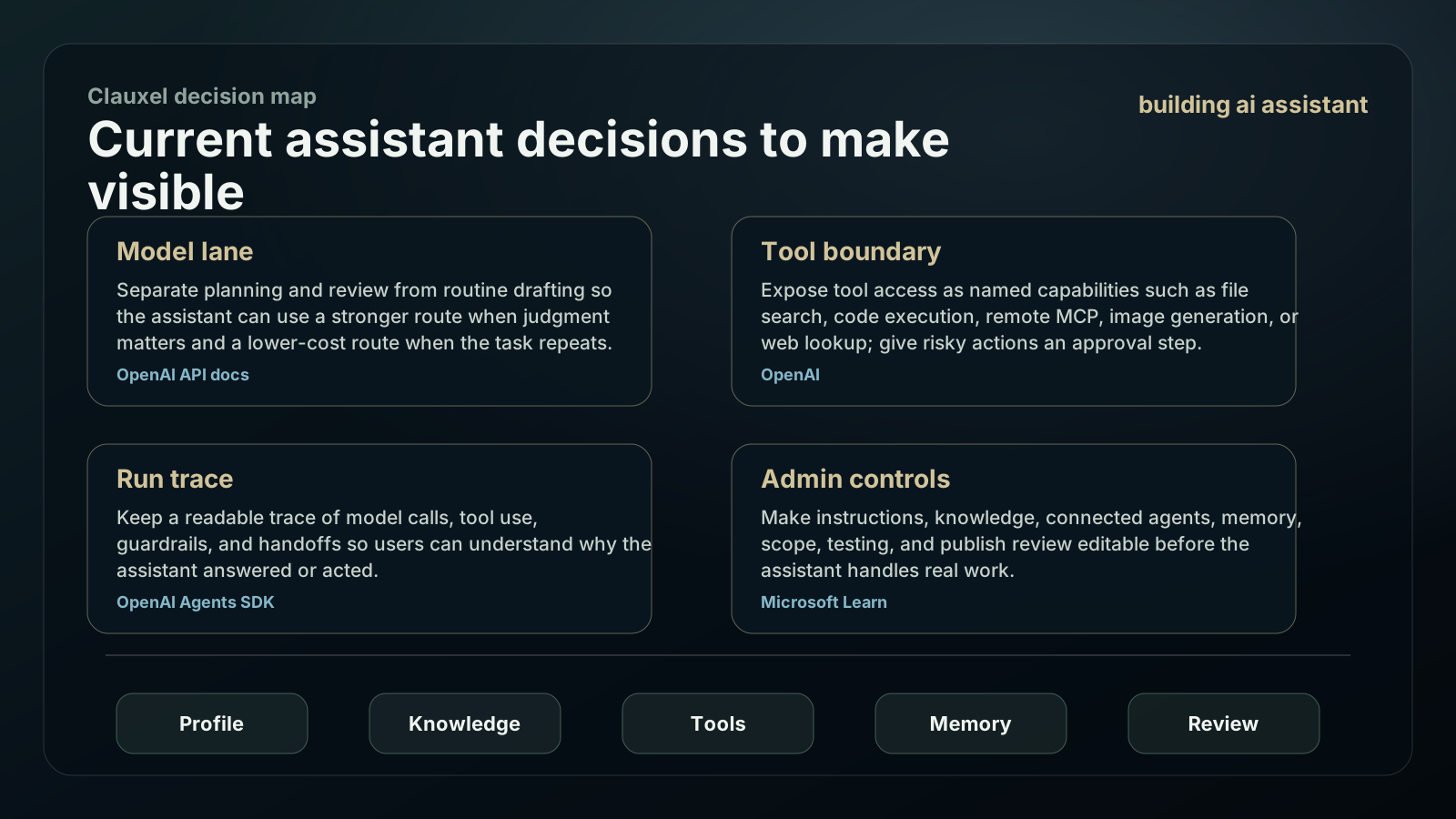
Current assistant decisions to make visible
A useful assistant should show model lane, trusted context, tool boundary, memory, traces, and approval in the product. Treat current platform primitives as control choices the user can inspect.
Separate planning and review from routine drafting so the assistant can use a stronger route when judgment matters and a lower-cost route when the task repeats.
Expose tool access as named capabilities such as file search, code execution, remote MCP, image generation, or web lookup; give risky actions an approval step.
Keep a readable trace of model calls, tool use, guardrails, and handoffs so users can understand why the assistant answered or acted.
Make instructions, knowledge, connected agents, memory, scope, testing, and publish review editable before the assistant handles real work.
Build the assistant from trust outward.
Start with the user relationship, then add knowledge and tools only where the assistant needs them to complete the repeated job.
Write the assistant card
Define who the assistant helps, what job it handles, what good answers look like, and what it should never pretend to know.
Select a trusted knowledge set
Bring only the notes, policies, examples, and source summaries the assistant needs for the first job. Give the user a way to inspect and correct them.
Connect read tools first
Start with retrieval, file reading, and safe lookup. Add write, send, deploy, or checkout actions only after the assistant has passed review examples.
Design memory receipts
When the assistant keeps a preference or lesson, show what was saved, why it helps future work, and how the user can edit or forget it.
Route models by responsibility
Use stronger reasoning for planning and review, faster routes for routine transformation, and specialist routes for media or long context.
Launch with five examples
Keep a launch notebook with passed answers, rejected answers, corrected memory, refused actions, and the next boundary change.
Assistant boundary ladder
Use this ladder to decide whether the assistant is ready for more power. Each higher layer should inherit the boundaries below it.
| Layer | Ready signal | Do not advance if | Coachix check |
|---|---|---|---|
| Profile | The user can explain the assistant role in one sentence. | The role sounds like a generic helper. | Save a narrow assistant card. |
| Knowledge | Answers show when they use trusted material. | The assistant guesses from stale or hidden context. | Attach an editable knowledge set. |
| Tools | The visible tool list separates read, draft, and action. | A tool can change outside systems silently. | Require confirmation for action tools. |
| Memory | Saved preferences and lessons are inspectable. | Memory is a mystery the user cannot correct. | Show a memory receipt after important sessions. |
| Review | Risky runs leave a clear trace and handoff. | Users only see the final answer. | Review source, tool, and decision together. |
Permission map for the first launch
Building AI assistant trust depends on ordinary controls. The assistant may be warm and capable, but external effects should still be visible.
Copy the assistant boundary brief
Build a private AI assistant:

Assistant role:
Primary user:
Repeated job:
Trusted knowledge:
Read tools:
Draft tools:
Action tools requiring approval:
Memory to save:
Memory never to save:
Review examples:
Launch blocker:
| Permission area | Allowed first | Keep out until review |
|---|---|---|
| Read files and notes | Allowed after the user selects the workspace material. | Do not read unrelated private folders. |
| Draft answers or documents | Allowed when the output stays in the workspace. | Do not send or publish without review. |
| Use external tools | Allowed for lookup or transformation after the tool purpose is visible. | Ask before account changes, deletion, paid actions, or public release. |
| Save memory | Allowed for stable preferences, decisions, source summaries, and reusable lessons. | Do not store raw secrets, private clutter, or guesses about the user. |
| Escalate to agent behavior | Allowed only after examples, tool traces, and stop rules are boringly repeatable. | Do not call autonomy a feature before the loop is reviewable. |
Assistant risks users feel immediately.
A small assistant with clear limits earns trust faster than a broad assistant that surprises people.
If the assistant sounds polished but ignores the user material, it feels replaceable.
If users cannot inspect memory, they cannot correct the next answer.
The assistant should not change accounts, files, or public pages before the user sees the action.
Without passed and failed examples, every improvement discussion starts from memory instead of evidence.
What this page assumes
This page treats an AI assistant as a private workspace companion. It does not claim that every assistant needs autonomy, many agents, or local hosting.
Use a simpler chat feature when the job is one-off and does not need memory, tools, or a repeatable review loop.
Use an agent loop only when the assistant must make multi-step decisions and can be tested with traces.
Use local or self-hosted models when privacy, network policy, or ownership matters enough to accept operating cost.
Review current platform docs before copying older assistant API patterns into a new build.
Signals to review after the first assistant week
The first week should prove that the assistant is understandable from the outside. Review the work as a product surface, not as a private prompt experiment.
Count answers the user reused without rewriting the structure. Keep examples where the assistant used trusted knowledge correctly.
Save the moments where the user edited role, source, memory, or permission language. Those corrections are the next product backlog.
Watch whether the assistant asks before risky actions. A few clean stops are better than one surprising action.
Review what the assistant saved and whether the user would be comfortable seeing that memory before the next session.
Building AI Assistant: Private Workspace Guide FAQ
Use these answers to decide the first build shape, then bring the idea back into Coachix for the role, tools, sources, and review trace.
What should I build first in an AI assistant?
Build the assistant card and one repeatable job first. Then connect the knowledge and tools needed for that job.
How much memory should an assistant keep?
Keep durable preferences, decisions, source summaries, and reusable lessons. Do not keep raw secrets, every transcript, or private clutter by default.
When does an assistant become an agent?
It becomes agent-like when it can use tools and manage steps toward a goal. The user-facing assistant boundary should still remain visible.
Where does Coachix fit?
Coachix gives the assistant one place for profile, knowledge, tools, skills, model routes, review traces, and private launch notes.
Continue the Coachix build path.
Move between assistant, bot, pipeline, solution, prototype, and agent pages without losing the private workspace boundary.