Use fixed answers for stable policies, greetings, menu choices, status categories, and required disclaimers.
Bot boundary guide
Building AI bot systems works when the conversation has a boundary.
Use this guide when the first product shape is a bot, but you need to decide which parts stay scripted, which parts use language reasoning, and which actions need a human checkpoint.
Decision / bot boundary guide
building ai bot
01Script02Answer03Collect04Route05Escalate
FAQKnowledgeFormQueueAgent
A bot is the front door, not always the whole system.
Building AI bot experiences should start with conversation scope. A bot can answer routine questions, collect structured input, and route users. It should become an assistant only when it needs memory or private knowledge, and become an agent only when it must use tools toward a goal. The best first bot is clear about what kind of help it offers. Routine answers, intake, routing, and drafting can share a screen while keeping different permission levels.
Use retrieval when the answer depends on selected documents, product notes, or current workspace material.
Collect fields the downstream workflow needs instead of letting the user and bot wander in circles.
Move to human review or an agent workflow when the task needs external action, judgment, or long-running state.
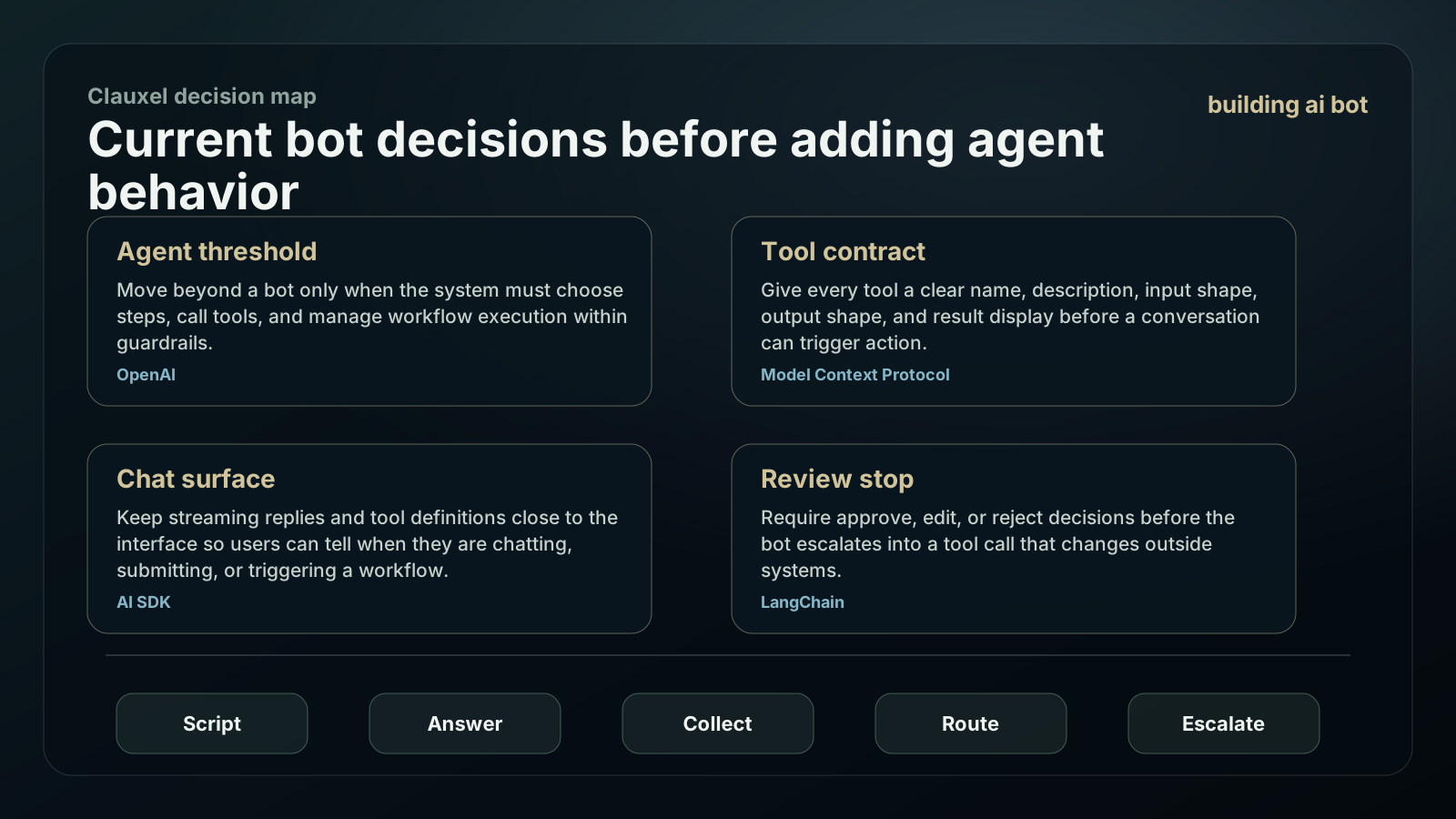
Current bot decisions before adding agent behavior
A bot should stay a clear front door until the job needs private knowledge, memory, tool use, or workflow execution. Make the escalation path visible before adding agent behavior.
Move beyond a bot only when the system must choose steps, call tools, and manage workflow execution within guardrails.
Give every tool a clear name, description, input shape, output shape, and result display before a conversation can trigger action.
Keep streaming replies and tool definitions close to the interface so users can tell when they are chatting, submitting, or triggering a workflow.
Require approve, edit, or reject decisions before the bot escalates into a tool call that changes outside systems.
Build the bot as a triage system first.
A bot gets safer when every conversation path has a purpose and a stopping point.
List the top conversations
Choose the repeated questions, intake paths, and routing decisions that justify the bot.
Mark fixed answers
Keep stable policy and product facts scripted where deterministic copy is safer than generation.
Add grounded response lanes
Use retrieval only for material the bot may cite or summarize. Show when the answer is grounded and when it is general.
Design the form handoff
For requests that need action, collect structured fields and pass them to the right assistant, queue, or human reviewer.
Set refusal and escalation rules
Define when the bot should stop, ask for a human, or move to a deeper workflow.
Measure the conversation
Track page view, CTA clicks, copy actions, form starts, handoffs, and unresolved paths without storing sensitive free text.
Bot boundary triage table
Use this table to avoid giving a simple bot responsibilities that belong to an assistant, pipeline, or agent.
| User need | Best first shape | Why | Escalate when |
|---|---|---|---|
| Routine FAQ | Scripted bot reply | The answer is stable and should not drift. | The user needs private account or project context. |
| Document question | Grounded assistant answer | The answer depends on selected material and source trace. | The answer requires external action. |
| Lead or support intake | Structured bot form | The workflow needs fields more than open-ended chat. | The next step requires judgment or approval. |
| Workflow execution | Agent or pipeline | The system must plan, call tools, and recover from errors. | The action touches payment, public content, deletion, or settings. |
| Ambiguous request | Human handoff | The user goal or risk cannot be safely inferred. | The same missing input repeats. |
Conversation permissions by depth
A bot can feel intelligent without being allowed to do everything. Make the depth visible.
Copy the bot boundary brief
Build an AI bot:

Top conversations:
Fixed answers:
Knowledge sources:
Fields to collect:
Routing destinations:
Actions never automatic:
Human handoff triggers:
Agent handoff triggers:
Analytics events:
Review examples:
| Permission area | Allowed first | Keep out until review |
|---|---|---|
| Menu and FAQ | Answer from fixed copy and link to relevant pages. | Do not invent policy or pricing details. |
| Knowledge answer | Read selected material and summarize with context. | Do not read private material outside the chosen set. |
| Intake form | Collect structured fields and send the user to review. | Do not collect secrets or sensitive free text by default. |
| Draft action | Prepare a message, plan, or ticket for review. | Do not send, publish, deploy, or change status automatically. |
| Agent handoff | Start a bounded agent or pipeline with trace and stop rules. | Do not hide the handoff behind a chat reply. |
Bot mistakes that create support debt.
The risk is not that the bot is too small. The risk is pretending a small bot owns a bigger workflow.
A bot with no topic boundary creates long conversations without better outcomes.
Generated answers to stable policies can create contradictions and support cleanup.
Users need to know when they are leaving a bot and entering a reviewed workflow.
Free-text intake can accidentally gather secrets, personal data, or account details the bot should not store.
When to build something beyond a bot
Building AI bot interfaces is enough for many front-door tasks. Grow only when the job demands more.
Move to an assistant when users need private knowledge, memory, and a persistent role.
Move to a pipeline when requests must produce a structured artifact through repeated stages.
Move to an agent when tool use, planning, recovery, and trace review are required.
Keep routine FAQ scripted when correctness and consistency matter more than conversational flexibility.
Bot launch signals that show the boundary is working
A bot should reduce confusion at the front door. The first measurement pass should tell you which conversations stay scripted and which need a deeper system.
Count conversations that reached a clear answer, form, link, or handoff without long clarification loops.
Review whether users could tell when the bot moved them to human review, assistant help, or an agent workflow.
Compare generated answers against fixed policy copy. Anything that must never drift should stay scripted.
Watch for free-text fields that invite secrets, private account details, or personal data the bot should not retain.
Building AI Bot: Conversation Boundary Guide FAQ
Use these answers to decide the first build shape, then bring the idea back into Coachix for the role, tools, sources, and review trace.
What is the first step in building AI bot products?
List the top conversations and mark which ones are scripted, grounded, structured intake, or escalation paths.
Is an AI bot the same as an AI assistant?
No. A bot is often a front-door conversation surface. An assistant has a user-facing role, knowledge, memory, and repeatable help across sessions.
When should a bot call tools?
Only when the tool purpose, input schema, output, and side effect are visible, and risky actions require confirmation.
How does Coachix help with AI bots?
Coachix helps move from bot conversation to assistant, pipeline, or agent flow while keeping knowledge, permissions, tools, and traces reviewable.
Continue the Coachix build path.
Move between assistant, bot, pipeline, solution, prototype, and agent pages without losing the private workspace boundary.