Normalize user request, files, metadata, allowed sources, privacy flags, and success criteria before the first model call.
Pipeline runtime guide
Building AI pipeline systems means designing the run, not just the model call.
Use this guide when an AI workflow needs repeatable intake, context assembly, model routing, tool execution, review checkpoints, retries, and a clean handoff.
Integration / workflow guide
building ai pipeline
01Intake02Context03Route04Tool05Review06Handoff
QueueSourcesDecisionActionCheckpointArtifact
The artifact is the spine of the pipeline.
Building AI pipeline infrastructure starts with the artifact that moves through the system. Define what enters, how context is attached, which model route handles each stage, which tools can act, how failures are retried, and what trace proves the result is ready. Before choosing frameworks, name the thing that enters and leaves every stage: a ticket, lead, document, release, report, image, spreadsheet, or review packet.
Attach trusted knowledge, recent sources, prior decisions, and examples so the model sees the right material at the right step.
Route simple classification, generation, tool use, and review to different stages instead of asking one prompt to do everything.
Store the final artifact with sources, model route, tool results, warnings, and the next human decision.
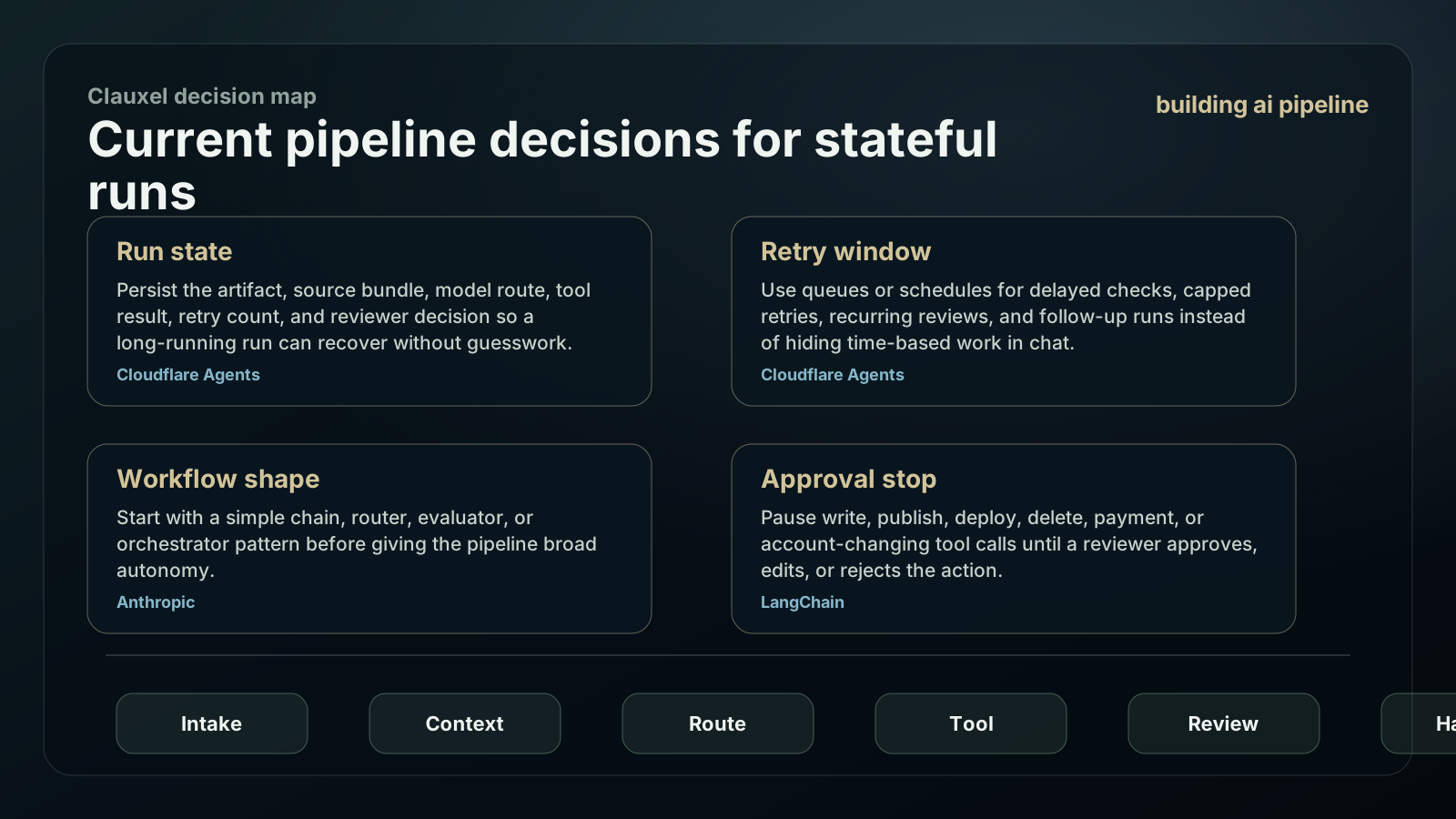
Current pipeline decisions for stateful runs
A serious pipeline should preserve the artifact, show the stage path, pause on risky actions, and resume cleanly. Treat state, retry, routing, and review as product requirements.
Persist the artifact, source bundle, model route, tool result, retry count, and reviewer decision so a long-running run can recover without guesswork.
Use queues or schedules for delayed checks, capped retries, recurring reviews, and follow-up runs instead of hiding time-based work in chat.
Start with a simple chain, router, evaluator, or orchestrator pattern before giving the pipeline broad autonomy.
Pause write, publish, deploy, delete, payment, or account-changing tool calls until a reviewer approves, edits, or rejects the action.
Build the run graph from the handoff backward.
A pipeline becomes easier to debug when the final handoff defines what each upstream stage must provide.
Define the output packet
Write the exact artifact that a reviewer expects: summary, table, decision, draft, score, file, or task update.
Set the intake contract
Collect only the fields the pipeline needs: user request, source material, permissions, deadline, sensitivity, and accepted formats.
Choose stage boundaries
Separate retrieval, classification, generation, tool execution, validation, and review so failures have a visible location.
Route models by stage
Use a fast model for routine extraction, a stronger model for planning or synthesis, and a reviewer route for high-risk conclusions.
Make tools narrow
Each tool should belong to a stage, expose a plain schema, return a predictable result, and declare whether it changes external state.
Write retry and stop rules
Define when the pipeline retries, asks for missing input, falls back to a simpler path, or stops with a useful handoff.
Pipeline run graph
This graph keeps the workflow observable. The goal is not more stages; the goal is a run that can explain where a result came from.
| Stage | Input | Output | Failure signal |
|---|---|---|---|
| Intake | Request, files, privacy flag, target format | Validated input packet | Missing owner, vague goal, or unsupported file type |
| Context | Knowledge set, current sources, examples | Grounded context bundle | Weak source, stale fact, or private material outside scope |
| Reasoning route | Context bundle and task contract | Plan, draft, classification, or decision | Low confidence, missing evidence, or conflicting sources |
| Tool action | Approved tool call and schema | Tool result with side-effect note | Unexpected result, unsafe action, or repeated tool error |
| Review | Artifact, trace, warnings, and next step | Approved output or handoff | Reviewer cannot see why the result was produced |
Pipeline control table
A pipeline can run quickly without becoming opaque. Put the most dangerous actions behind explicit checkpoints.
Copy the pipeline contract
Build an AI pipeline:

Artifact entering the run:
Final artifact:
Required input fields:
Trusted sources:
Stage boundaries:
Model route by stage:
Tools allowed:
Approval checkpoints:
Retry rule:
Stop rule:
Trace fields to save:
| Permission area | Allowed first | Keep out until review |
|---|---|---|
| Read stage | Read selected files, pages, records, and source material. | No broad account crawl without a stated scope. |
| Transform stage | Summarize, classify, extract, compare, and draft inside the workspace. | No public claims without visible evidence. |
| Tool stage | Call approved APIs or MCP tools with narrow schemas. | No write, deploy, email, delete, payment, or settings change without approval. |
| Review stage | Show the artifact, sources, tool results, errors, and confidence notes. | Do not hide uncertainty behind a polished final answer. |
| Learning stage | Save stable lessons, schema fixes, and reusable skills after review. | Do not save secrets or raw private text as permanent memory. |
Pipeline failure modes worth designing for.
Most pipeline problems are not model problems. They are missing contracts, hidden state, broad tools, and outputs that cannot be reviewed.
The pipeline cannot recover if the first packet lacks owner, goal, source, and success condition.
Retrieval that mixes trusted files, web claims, and old examples without labels makes review hard.
A tool that can read and write in one vague call is hard to approve and hard to debug.
Retries should have a cap, reason, and final handoff when the same failure repeats.
When a pipeline is the wrong first build
A pipeline is useful when the same kind of artifact moves through repeated stages. It is overkill when one strong prompt and a human review are enough.
Start with a single assistant interaction if the job is still exploratory.
Use deterministic code for transformations that do not require language judgment.
Treat multi-agent orchestration as a later step unless separate responsibilities are already clear.
Keep pricing, private data, account actions, and public release behind a visible review checkpoint.
Pipeline signals to inspect before scaling
A pipeline earns more automation only after the run graph explains itself. Treat every failed run as evidence about intake, context, routing, tools, or review.
Track how often a run starts with missing owner, format, source, deadline, or sensitivity fields. Fix intake before adding stages.
Compare outputs that cite the right bundle against outputs that mix old examples, weak sources, or unlabeled private material.
Log which stage stops the run. Repeated failure in one stage means the contract is weak, not that the whole pipeline failed.
Measure whether reviewers can approve faster because the trace shows source, route, tool result, warning, and next decision.
Building AI Pipeline: Workflow Runtime Guide FAQ
Use these answers to decide the first build shape, then bring the idea back into Coachix for the role, tools, sources, and review trace.
What is the first thing to define when building AI pipeline workflows?
Define the final artifact and the input packet. The stage design should serve that handoff.
Should an AI pipeline use one model or several?
Use one strong baseline first, then split stages by responsibility when speed, cost, quality, or review needs differ.
Where do tools fit in an AI pipeline?
Tools belong to explicit stages with narrow schemas, expected outputs, side-effect notes, and approval rules for risky operations.
How can Coachix help with AI pipelines?
Coachix keeps source material, model routes, tools, skills, review notes, and run traces in one private workspace.
Continue the Coachix build path.
Move between assistant, bot, pipeline, solution, prototype, and agent pages without losing the private workspace boundary.