Browser app route
The downloads page describes a local app surface with backend and frontend setup. Treat that as a test surface first, not immediate proof that every tool, file, model, or connector is ready for a real assistant.
Local-first assistant route
Resolve the OpenJarvis project behind the openjarvis keyword, then prepare one harmless local route before tools, memory, private files, or a served API become part of the workflow.
The route is ready only when the source, version, install surface, first task, and permission boundary can be read back without guessing.
Quick answer
For this Coachix page, openjarvis means the open-source OpenJarvis framework from the open-jarvis GitHub organization and related project materials. It is a local-first personal AI stack, not a generic model name and not every same-name product that appears for the keyword.
The current check separates three layers: GitHub releases show Desktop desktop-v1.0.2 and the v1.0.0 architecture release, PyPI shows OpenJarvis 1.0.3 uploaded on June 29, 2026, and the docs describe quickstart, browser app, tools, memory, skills, and API server paths. Treat those as a route ledger before installation.
The safe first action is deliberately small: choose one official install surface, run one synthetic task through one agent or preset, record the engine and permissions, then stop before private files, calendars, repositories, shell access, persistent memory, or public actions enter the route.
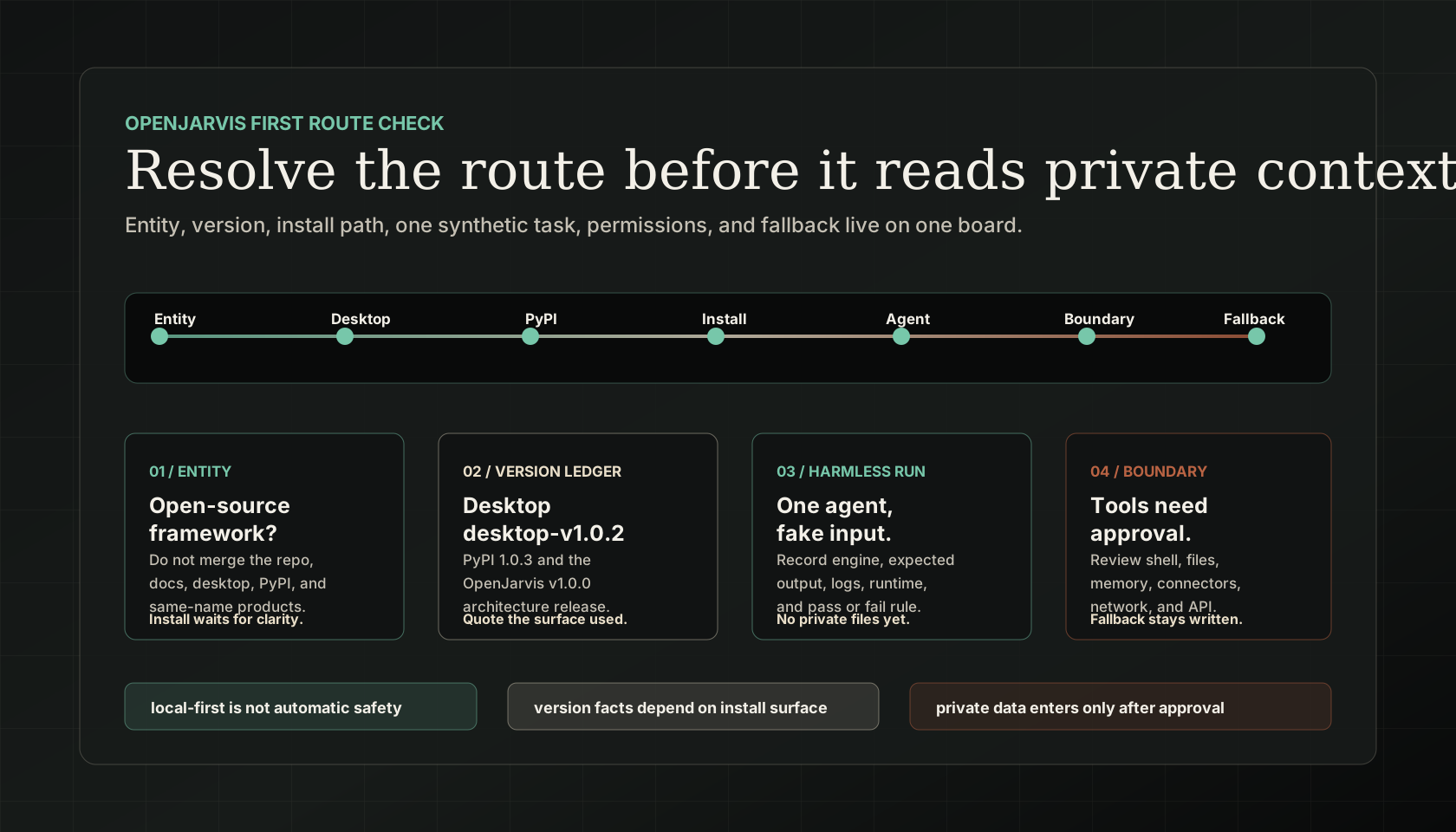
Release ledger
Keep these facts together so a desktop decision, Python package decision, source checkout, and same-name product result do not get blended into one vague openjarvis plan.
| Entity boundary | The exact openjarvis query can surface the OpenJarvis open-source framework and same-name products. Keep the open-source framework, desktop release, browser app, PyPI package, and home AI device results separate before a teammate installs anything. open-jarvis / GitHub open-jarvis / GitHub Yumi Lab Open Jarvis |
|---|---|
| Release and package ledger | GitHub releases list Desktop desktop-v1.0.2 from May 25, 2026 and OpenJarvis v1.0.0 from May 16, 2026. PyPI lists OpenJarvis 1.0.3 uploaded June 29, 2026, so quote both desktop and package state instead of collapsing them into one version. open-jarvis / GitHub PyPI |
| Framework shape | OpenJarvis describes a local-first personal AI framework built around five shared primitives: Intelligence, Engine, Agents, Tools and Memory, and Learning. open-jarvis / GitHub Stanford SAIL / Hazy Research Hugging Face Papers |
| Runtime and install route | The PyPI package declares Python >=3.10,<3.14, while the docs describe virtual environment or uv-run assumptions, installer paths, desktop downloads, jarvis init, jarvis doctor, and browser-app setup. Review each command before running it on a private machine. PyPI OpenJarvis Docs OpenJarvis Docs OpenJarvis Docs |
Reader fit
Visitors need entity clarity, release and package facts, one install choice, local engine assumptions, tool and memory boundaries, and a first synthetic route before OpenJarvis becomes a private assistant workflow.
| What is it? | For this page, openjarvis means the open-source OpenJarvis local-first personal AI framework, not every same-name product in search results. open-jarvis / GitHub Stanford SAIL / Hazy Research Yumi Lab |
|---|---|
| Which result should I trust first? | Use GitHub releases for desktop and architecture release state, PyPI for package state, the upstream repository and docs for install and architecture, and same-name product pages only for ambiguity checks. open-jarvis / GitHub PyPI open-jarvis / GitHub OpenJarvis Docs |
| What is current? | The checked sources show Desktop desktop-v1.0.2, OpenJarvis v1.0.0, and PyPI 1.0.3. The version that matters depends on whether you are using desktop, source/docs, or package install. open-jarvis / GitHub PyPI |
| How do I install it? | Official docs provide shell, Windows, desktop, browser-app, and PyPI routes, but commands assume environment setup such as venv or uv run in several examples. OpenJarvis Docs OpenJarvis Docs OpenJarvis Docs PyPI |
| What can I build first? | Start with one built-in agent or preset such as morning digest, deep research, code assistant, scheduled monitor, or chat-simple before connecting real sources. open-jarvis / GitHub OpenJarvis Docs |
| What needs permissions? | Skills, tools, memory, shell access, filesystem reads, connectors, network use, and OpenAI-compatible API serving all need explicit boundaries before private data enters the route. OpenJarvis Docs Stanford SAIL / Hazy Research |
| What should Coachix prepare? | Coachix should hold the review note: entity, install path, engine, agent, first synthetic task, pass/fail criteria, permission boundary, and fallback. open-jarvis / GitHub Hugging Face Papers |
Route facts
These checks turn a local-first assistant idea into a route that can be reviewed before private context enters the loop.
The downloads page describes a local app surface with backend and frontend setup. Treat that as a test surface first, not immediate proof that every tool, file, model, or connector is ready for a real assistant.
Upstream materials list starter routes such as morning digest, deep research, code assistant, scheduled monitor, and chat-simple, plus built-in agents including morning_digest, deep_research, orchestrator, native_react, operative, native_openhands, and simple.
OpenJarvis skills are reusable compositions of tools, sub-skills, and instructions. Review each tool, memory index, shell step, connector, network call, and API-serving path as permissioned surface area.
The published paper frames OpenJarvis as a typed spec over five primitives and reports on-device specs matching or exceeding cloud accuracy on four of eight benchmarks, with lower marginal API cost and latency. Use those claims as research context, not as local readiness proof.
GitHub issues show practical questions around tool calls, launch, download, calendars, memory, personas, and service behavior. Check open issues before making OpenJarvis the default route for private workflows.
Decision helper
Choose the smallest unresolved check and keep the next action specific. The console link is for planning the route, not pretending the install has passed.
Use this first when the team only says openjarvis. Record the GitHub repository, desktop release, PyPI package, docs route, or same-name product page before installation or planning continues.
Safe sequence
Confirm the entity: open-source OpenJarvis framework, desktop release, browser app, PyPI install, or a same-name product.
Choose one install surface and write the version facts beside it: Desktop desktop-v1.0.2, OpenJarvis v1.0.0 architecture release, or PyPI 1.0.3.
Run one synthetic task through one engine and one agent or preset, then record expected output, runtime, logs, permissions, and fallback.
Review tools, memory, skills, shell, API serving, and connector permissions before any private workflow depends on the route.
Permission boundary
The useful promise is local-first personal AI, but the first operational question is smaller: can this OpenJarvis route start, choose an engine, run one agent, and produce a trace you can inspect without touching anything sensitive?
Begin with identity because the keyword is shared. A page, package, desktop release, docs page, or teammate saying openjarvis is not enough. Pin the GitHub repository, release, docs route, desktop app, browser app, PyPI package, or same-name product page before the work proceeds.
Then keep the first run intentionally plain. Use a synthetic morning digest, small research task, code-assistant fixture, or chat-simple task. The point is not to prove the whole personal assistant dream in one run; it is to prove setup, model backend, logs, permissions, and fallback behavior.
Coachix should hold the review note around OpenJarvis: what it may read, which tools it may call, whether memory is enabled, how a served API is guarded, and what a human must approve before private sources, calendars, repositories, shell actions, or public work enter the loop.
Copyable handoff
Review openjarvis for one local-first personal AI route. First identify the exact entity and source: open-source OpenJarvis repository, GitHub release, official docs, desktop app, browser app, PyPI package, or same-name product. Then list current version facts, install path, runtime requirements, engine, agent or preset, tools, memory, skills, API serving boundary, expected synthetic task, pass/fail criteria, fallback, and approval rules. Do not invent install completion, local model availability, API keys, hardware support, benchmark results, account access, private-file permission, shell permission, or connector access.
FAQ
For this Coachix page, yes: the primary entity is the open-source OpenJarvis local-first personal AI framework. The exact search term also finds same-name products, so entity confirmation stays first.
The sources checked on August 7, 2026 show Desktop desktop-v1.0.2 on GitHub releases, OpenJarvis v1.0.0 as the architecture release, and PyPI 1.0.3 uploaded June 29, 2026. Use the fact that matches your install surface.
Official docs provide installer routes, desktop releases, and a browser-app quickstart. Review commands, Python and Node requirements, Ollama or engine setup, virtual environment assumptions, and rollback before running them.
Test one built-in agent or preset with synthetic data. Pass only if the setup, engine, output, logs, permissions, and fallback are understandable.
No. Treat tools, memory, skills, shell access, connectors, and served APIs as permissioned surfaces. Connect them only after the route and approval boundary are clear.
Related Coachix pages